Friday, June 19, 2009

Restore files from a damaged hard drive using ZAR

Restore files from a damaged hard drive using ZAR

Came across this app at TR, haven't used it yet but thought it could come in handy one day.

http://blogs.techrepublic.com.com/window-on-windows/?p=940&tag=nl.e103

Zero Assumption Recovery (ZAR, for short) is a shareware-based utility that can scan your hard drive for files, even if it has been reformatted or is damaged. Using a fairly simple wizard-based user interface, ZAR will walk you through the steps to recover important data from an otherwise inaccessible hard drive.

The download comes as the free trial shareware version with some important limitations. Per wizard cycle, you are allowed to select files in only four folders. While this may seem okay, be warned that if your My Documents folder is arranged like:

  • My Documents
  • Home
  • My Pictures
  • My Videos
  • School
  • Work

You will be unable to choose just the My Documents folder and get all those subfolders and their files. You will instead have to make multiple passes with ZAR in trial mode to get all your files restored.

The other option is to pay for a license key. Currently, ZAR costs $49.95 for a single-user instance, which, depending on the importance of the data you are going to lose, may just be worth it. The alternative is seeking out a computer repair shop to do the work, which might more than double that cost.

Wednesday, April 15, 2009

The Most Accurate PDF-to-Word Converter

The Most Accurate PDF-to-Word Converter

Using our PDF-to-Word conversion technology, you can quickly and easily create editable DOC/RTF files, making it a cinch to re-use PDF content in applications like Microsoft Word, Excel, OpenOffice, and WordPerfect.
Best of all, it's entirely free!

http://www.pdftoword.com

I tested this out with a PDF manual I had lying around on my desktop and it seemed to do a pretty good job, for FREE too!

Friday, February 27, 2009

Imaging a new Dell Latitude E6400

Below is my tiny little check list to Imaging a new Dell Latitude E6400 using GHOST.

Boot E6400
Enter BIOS Setep
-Go to System Configuration
--SATA Operation
---Switch from IRRT to ATA
Apply Settings and Exit

System restarts, hit F12 at boot menu
Boot to USB BartPE disc
Image the system with GHOST

When imaging completes, restart system
Enter BIOS Setep
-Go to System COnfiguration
--SATA OPeration
---Switch from ATA to IRRT
Apply Settings and Exit


Reboot and you should be done, my last step was to run the MS NewSID executable upon first boot up to rename the system and run a new random SID.

Monday, February 23, 2009

Cool File Recovery Tool

Haven't tried this yet, but it may come in handy in the future.

DiskDigger can recover files from any type of media that your computer can read. This includes USB flash drives, memory cards (SD, CompactFlash, Memory Stick, etc), and of course your hard drive. The types of files that it recovers includes photos, videos, music, documents, and other formats.

DiskDigger works by thoroughly scanning each sector of your media for traces of files. This has some advantages and disadvantages (read on to find out).

Monday, February 16, 2009

Send e-mail to cell phones

Send e-mail to cell phones. You can send e-mail to anybody, as long as their cell phone supports Short Message Service (SMS).

  1. Create a new e-mail message.
  2. In the To text box, enter the cell phone number using the following syntax: 10-digit-number@carrierdomain.com
  3. Send the e-mail.

Below is a list of the major carrier domains:

Alltel@message.alltel.com
Cingular/AT&T@txt.att.net
Nextel@messaging.nextel.com
Sprint@messaging.sprintpcs.com
SunCom@tms.suncom.com
T-mobile@tmomail.net
VoiceStream@voicestream.net
Verizon@vtext.com

Wednesday, February 11, 2009

Virtual CloneDrive

Virtual CloneDrive


http://www.slysoft.com/en/virtual-clonedrive.html


Virtual CloneDrive works and behaves just like a physical CD/DVD drive, however it exists only virtually. Image files generated with CloneDVD or CloneCD can be mounted onto a virtual drive from your hard-disk or from a network drive and used in the same manner as inserting them into a normal CD/DVD drive.

Probably the best virtual drive software, Virtual CloneDrive allows you to enjoy the freedom of a virtual drive and is completely free.
Features
  • Supports all common image formats such as ISO, BIN, CCD
  • Supports up to 8 virtual drives at the same time
  • Easy to use - just double-click an image file to mount as a drive
  • Virtual CloneDrive is freeware, you may use it at no cost.
System Requirements
  • An IBM-compatible personal computer with a minimum 500 MHz Pentium-class microprocessor (1 GHz recommended) and 128 MB RAM (256 MB recommended)
  • Windows 98/98SE/ME/2000/XP/XP64/VISTA/VISTA64
  • If you use Windows 2000 or Windows XP you must be an administrator to install Virtual CloneDrive

Tuesday, February 10, 2009

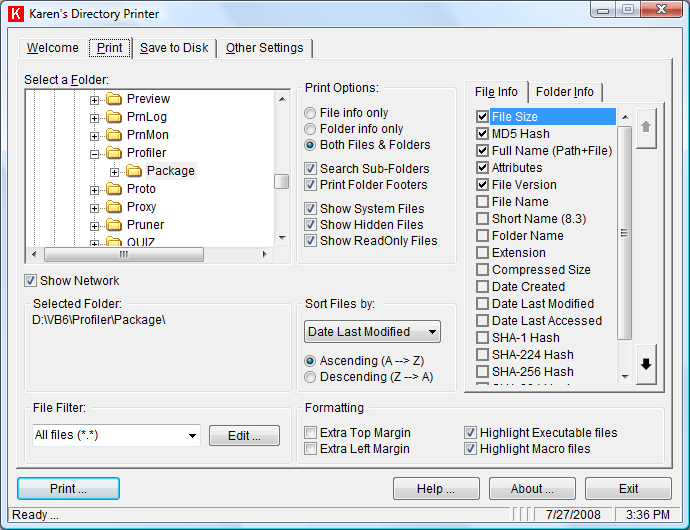
Directory Printer v5.3.1

Nice power tool

http://www.karenware.com/powertools/ptdirprn.asp

Directory Printer v5.3.1

** Updated November 17, 2008

Download your copy of Karen's Directory Printer

No more fumbling with My Computer or Windows Explorer, wishing you could print information about all your files. Karen's Directory Printer can print the name of every file on a drive, along with the file's size, date and time of last modification, and attributes (Read-Only, Hidden, System and Archive)! And now, the list of files can be sorted by name, size, date created, date last modified, or date of last access.